 bc4e6db749
Solves #700 ## State of the World Before Prior to this PR, when users wanted to share file contents with Codex, they had two options: - Manually copy and paste file contents into the chat - Wait for the assistant to use the shell tool to view the file The second approach required the assistant to: 1. Recognize the need to view a file 2. Execute a shell tool call 3. Wait for the tool call to complete 4. Process the file contents This consumed extra tokens and reduced user control over which files were shared with the model. ## State of the World After With this PR, users can now: - Reference files directly in their chat input using the `@path` syntax - Have file contents automatically expanded into XML blocks before being sent to the LLM For example, users can type `@src/utils/config.js` in their message, and the file contents will be included in context. Within the terminal chat history, these file blocks will be collapsed back to `@path` format in the UI for clean presentation. Tag File suggestions: <img width="857" alt="file-suggestions" src="https://github.com/user-attachments/assets/397669dc-ad83-492d-b5f0-164fab2ff4ba" /> Tagging files in action: <img width="858" alt="tagging-files" src="https://github.com/user-attachments/assets/0de9d559-7b7f-4916-aeff-87ae9b16550a" /> Demo video of file tagging: [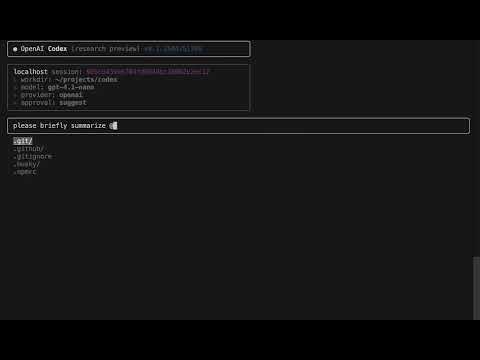](https://www.youtube.com/watch?v=vL4LqtBnqt8) ## Implementation Details This PR consists of 2 main components: 1. **File Tag Utilities**: - New `file-tag-utils.ts` utility module that handles both expansion and collapsing of file tags - `expandFileTags()` identifies `@path` tokens and replaces them with XML blocks containing file contents - `collapseXmlBlocks()` reverses the process, converting XML blocks back to `@path` format for UI display - Tokens are only expanded if they point to valid files (directories are ignored) - Expansion happens just before sending input to the model 2. **Terminal Chat Integration**: - Leveraged the existing file system completion system for tabbing to support the `@path` syntax - Added `updateFsSuggestions` helper to manage filesystem suggestions - Added `replaceFileSystemSuggestion` to replace input with filesystem suggestions - Applied `collapseXmlBlocks` in the chat response rendering so that tagged files are shown as simple `@path` tags The PR also includes test coverage for both the UI and the file tag utilities. ## Next Steps Some ideas I'd like to implement if this feature gets merged: - Line selection: `@path[50:80]` to grab specific sections of files - Method selection: `@path#methodName` to grab just one function/class - Visual improvements: highlight file tags in the UI to make them more noticeable

266 lines
7.9 KiB
TypeScript
266 lines
7.9 KiB
TypeScript
import type { OverlayModeType } from "./terminal-chat";
|
||
import type { TerminalRendererOptions } from "marked-terminal";
|
||
import type {
|
||
ResponseFunctionToolCallItem,
|
||
ResponseFunctionToolCallOutputItem,
|
||
ResponseInputMessageItem,
|
||
ResponseItem,
|
||
ResponseOutputMessage,
|
||
ResponseReasoningItem,
|
||
} from "openai/resources/responses/responses";
|
||
|
||
import { useTerminalSize } from "../../hooks/use-terminal-size";
|
||
import { collapseXmlBlocks } from "../../utils/file-tag-utils";
|
||
import { parseToolCall, parseToolCallOutput } from "../../utils/parsers";
|
||
import chalk, { type ForegroundColorName } from "chalk";
|
||
import { Box, Text } from "ink";
|
||
import { parse, setOptions } from "marked";
|
||
import TerminalRenderer from "marked-terminal";
|
||
import React, { useEffect, useMemo } from "react";
|
||
|
||
export default function TerminalChatResponseItem({
|
||
item,
|
||
fullStdout = false,
|
||
setOverlayMode,
|
||
}: {
|
||
item: ResponseItem;
|
||
fullStdout?: boolean;
|
||
setOverlayMode?: React.Dispatch<React.SetStateAction<OverlayModeType>>;
|
||
}): React.ReactElement {
|
||
switch (item.type) {
|
||
case "message":
|
||
return (
|
||
<TerminalChatResponseMessage
|
||
setOverlayMode={setOverlayMode}
|
||
message={item}
|
||
/>
|
||
);
|
||
case "function_call":
|
||
return <TerminalChatResponseToolCall message={item} />;
|
||
case "function_call_output":
|
||
return (
|
||
<TerminalChatResponseToolCallOutput
|
||
message={item}
|
||
fullStdout={fullStdout}
|
||
/>
|
||
);
|
||
default:
|
||
break;
|
||
}
|
||
|
||
// @ts-expect-error `reasoning` is not in the responses API yet
|
||
if (item.type === "reasoning") {
|
||
return <TerminalChatResponseReasoning message={item} />;
|
||
}
|
||
|
||
return <TerminalChatResponseGenericMessage message={item} />;
|
||
}
|
||
|
||
// TODO: this should be part of `ResponseReasoningItem`. Also it doesn't work.
|
||
// ---------------------------------------------------------------------------
|
||
// Utility helpers
|
||
// ---------------------------------------------------------------------------
|
||
|
||
/**
|
||
* Guess how long the assistant spent "thinking" based on the combined length
|
||
* of the reasoning summary. The calculation itself is fast, but wrapping it in
|
||
* `useMemo` in the consuming component ensures it only runs when the
|
||
* `summary` array actually changes.
|
||
*/
|
||
// TODO: use actual thinking time
|
||
//
|
||
// function guessThinkingTime(summary: Array<ResponseReasoningItem.Summary>) {
|
||
// const totalTextLength = summary
|
||
// .map((t) => t.text.length)
|
||
// .reduce((a, b) => a + b, summary.length - 1);
|
||
// return Math.max(1, Math.ceil(totalTextLength / 300));
|
||
// }
|
||
|
||
export function TerminalChatResponseReasoning({
|
||
message,
|
||
}: {
|
||
message: ResponseReasoningItem & { duration_ms?: number };
|
||
}): React.ReactElement | null {
|
||
// Only render when there is a reasoning summary
|
||
if (!message.summary || message.summary.length === 0) {
|
||
return null;
|
||
}
|
||
return (
|
||
<Box gap={1} flexDirection="column">
|
||
{message.summary.map((summary, key) => {
|
||
const s = summary as { headline?: string; text: string };
|
||
return (
|
||
<Box key={key} flexDirection="column">
|
||
{s.headline && <Text bold>{s.headline}</Text>}
|
||
<Markdown>{s.text}</Markdown>
|
||
</Box>
|
||
);
|
||
})}
|
||
</Box>
|
||
);
|
||
}
|
||
|
||
const colorsByRole: Record<string, ForegroundColorName> = {
|
||
assistant: "magentaBright",
|
||
user: "blueBright",
|
||
};
|
||
|
||
function TerminalChatResponseMessage({
|
||
message,
|
||
setOverlayMode,
|
||
}: {
|
||
message: ResponseInputMessageItem | ResponseOutputMessage;
|
||
setOverlayMode?: React.Dispatch<React.SetStateAction<OverlayModeType>>;
|
||
}) {
|
||
// auto switch to model mode if the system message contains "has been deprecated"
|
||
useEffect(() => {
|
||
if (message.role === "system") {
|
||
const systemMessage = message.content.find(
|
||
(c) => c.type === "input_text",
|
||
)?.text;
|
||
if (systemMessage?.includes("model_not_found")) {
|
||
setOverlayMode?.("model");
|
||
}
|
||
}
|
||
}, [message, setOverlayMode]);
|
||
|
||
return (
|
||
<Box flexDirection="column">
|
||
<Text bold color={colorsByRole[message.role] || "gray"}>
|
||
{message.role === "assistant" ? "codex" : message.role}
|
||
</Text>
|
||
<Markdown>
|
||
{message.content
|
||
.map(
|
||
(c) =>
|
||
c.type === "output_text"
|
||
? c.text
|
||
: c.type === "refusal"
|
||
? c.refusal
|
||
: c.type === "input_text"
|
||
? collapseXmlBlocks(c.text)
|
||
: c.type === "input_image"
|
||
? "<Image>"
|
||
: c.type === "input_file"
|
||
? c.filename
|
||
: "", // unknown content type
|
||
)
|
||
.join(" ")}
|
||
</Markdown>
|
||
</Box>
|
||
);
|
||
}
|
||
|
||
function TerminalChatResponseToolCall({
|
||
message,
|
||
}: {
|
||
message: ResponseFunctionToolCallItem;
|
||
}) {
|
||
const details = parseToolCall(message);
|
||
return (
|
||
<Box flexDirection="column" gap={1}>
|
||
<Text color="magentaBright" bold>
|
||
command
|
||
</Text>
|
||
<Text>
|
||
<Text dimColor>$</Text> {details?.cmdReadableText}
|
||
</Text>
|
||
</Box>
|
||
);
|
||
}
|
||
|
||
function TerminalChatResponseToolCallOutput({
|
||
message,
|
||
fullStdout,
|
||
}: {
|
||
message: ResponseFunctionToolCallOutputItem;
|
||
fullStdout: boolean;
|
||
}) {
|
||
const { output, metadata } = parseToolCallOutput(message.output);
|
||
const { exit_code, duration_seconds } = metadata;
|
||
const metadataInfo = useMemo(
|
||
() =>
|
||
[
|
||
typeof exit_code !== "undefined" ? `code: ${exit_code}` : "",
|
||
typeof duration_seconds !== "undefined"
|
||
? `duration: ${duration_seconds}s`
|
||
: "",
|
||
]
|
||
.filter(Boolean)
|
||
.join(", "),
|
||
[exit_code, duration_seconds],
|
||
);
|
||
let displayedContent = output;
|
||
if (message.type === "function_call_output" && !fullStdout) {
|
||
const lines = displayedContent.split("\n");
|
||
if (lines.length > 4) {
|
||
const head = lines.slice(0, 4);
|
||
const remaining = lines.length - 4;
|
||
displayedContent = [...head, `... (${remaining} more lines)`].join("\n");
|
||
}
|
||
}
|
||
|
||
// -------------------------------------------------------------------------
|
||
// Colorize diff output: lines starting with '-' in red, '+' in green.
|
||
// This makes patches and other diff‑like stdout easier to read.
|
||
// We exclude the typical diff file headers ('---', '+++') so they retain
|
||
// the default color. This is a best‑effort heuristic and should be safe for
|
||
// non‑diff output – only the very first character of a line is inspected.
|
||
// -------------------------------------------------------------------------
|
||
const colorizedContent = displayedContent
|
||
.split("\n")
|
||
.map((line) => {
|
||
if (line.startsWith("+") && !line.startsWith("++")) {
|
||
return chalk.green(line);
|
||
}
|
||
if (line.startsWith("-") && !line.startsWith("--")) {
|
||
return chalk.red(line);
|
||
}
|
||
return line;
|
||
})
|
||
.join("\n");
|
||
return (
|
||
<Box flexDirection="column" gap={1}>
|
||
<Text color="magenta" bold>
|
||
command.stdout{" "}
|
||
<Text dimColor>{metadataInfo ? `(${metadataInfo})` : ""}</Text>
|
||
</Text>
|
||
<Text dimColor>{colorizedContent}</Text>
|
||
</Box>
|
||
);
|
||
}
|
||
|
||
export function TerminalChatResponseGenericMessage({
|
||
message,
|
||
}: {
|
||
message: ResponseItem;
|
||
}): React.ReactElement {
|
||
return <Text>{JSON.stringify(message, null, 2)}</Text>;
|
||
}
|
||
|
||
export type MarkdownProps = TerminalRendererOptions & {
|
||
children: string;
|
||
};
|
||
|
||
export function Markdown({
|
||
children,
|
||
...options
|
||
}: MarkdownProps): React.ReactElement {
|
||
const size = useTerminalSize();
|
||
|
||
const rendered = React.useMemo(() => {
|
||
// Configure marked for this specific render
|
||
setOptions({
|
||
// @ts-expect-error missing parser, space props
|
||
renderer: new TerminalRenderer({ ...options, width: size.columns }),
|
||
});
|
||
const parsed = parse(children, { async: false }).trim();
|
||
|
||
// Remove the truncation logic
|
||
return parsed;
|
||
// eslint-disable-next-line react-hooks/exhaustive-deps -- options is an object of primitives
|
||
}, [children, size.columns, size.rows]);
|
||
|
||
return <Text>{rendered}</Text>;
|
||
}
|