- A new “/sessions” command is available for browsing previous sessions,
as shown in the updated slash command list

- The CLI now documents and parses a new “--history” flag to browse past
sessions from the command line

- A dedicated `SessionsOverlay` component loads session metadata and
allows toggling between viewing and resuming sessions

- When the sessions overlay is opened during a chat, selecting a session
can either show the saved rollout or resume it
Note the high-level motivation behind this change is to avoid the need
to make temporary changes in the source tree in order to cut a release
build since that runs the risk of leaving things in an inconsistent
state in the event of a failure. The existing code:

```
import pkg from "../../package.json" assert { type: "json" };
```

did not work as intended because, as written, ESBuild would bake the
contents of the local `package.json` into the release build at build
time whereas we want it to read the contents at runtime so we can use
the `package.json` in the tree to build the code and later inject a
modified version into the release package with a timestamped build
version.

Changes:

* move `CLI_VERSION` out of `src/utils/session.ts` and into
`src/version.ts` so `../package.json` is a correct relative path both
from `src/version.ts` in the source tree and also in the final
`dist/cli.js` build output
* change `assert` to `with` in `import pkg` as apparently `with` became
standard in Node 22
* mark `"../package.json"` as external in `build.mjs` so the version is
not baked into the `.js` at build time

After using `pnpm stage-release` to build a release version, if I use
Node 22.0 to run Codex, I see the following printed to stderr at
startup:

```
(node:71308) ExperimentalWarning: Importing JSON modules is an experimental feature and might change at any time
(Use `node --trace-warnings ...` to show where the warning was created)
```

Note it is a warning and does not prevent Codex from running.

In Node 22.12, the warning goes away, but the warning still appears in
Node 22.11. For Node 22, 22.15.0 is the current LTS version, so LTS
users will not see this.

Also, something about moving the definition of `CLI_VERSION` caused a
problem with the mocks in `check-updates.test.ts`. I asked Codex to fix
it, and it came up with the change to the test configs. I don't know
enough about vitest to understand what it did, but the tests seem
healthy again, so I'm going with it.
Solves #700
## State of the World Before
Prior to this PR, when users wanted to share file contents with Codex,
they had two options:
- Manually copy and paste file contents into the chat
- Wait for the assistant to use the shell tool to view the file
The second approach required the assistant to:
1. Recognize the need to view a file
2. Execute a shell tool call
3. Wait for the tool call to complete
4. Process the file contents
This consumed extra tokens and reduced user control over which files
were shared with the model.
## State of the World After
With this PR, users can now:
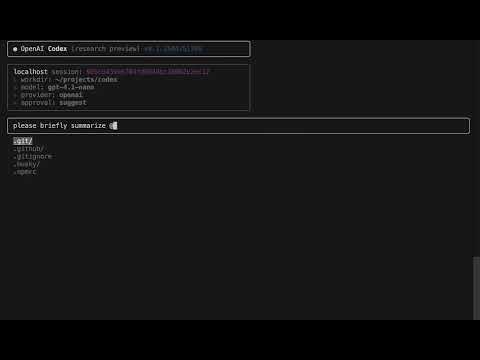
- Reference files directly in their chat input using the `@path` syntax
- Have file contents automatically expanded into XML blocks before being
sent to the LLM
For example, users can type `@src/utils/config.js` in their message, and
the file contents will be included in context. Within the terminal chat
history, these file blocks will be collapsed back to `@path` format in
the UI for clean presentation.
Tag File suggestions:
<img width="857" alt="file-suggestions"
src="https://github.com/user-attachments/assets/397669dc-ad83-492d-b5f0-164fab2ff4ba"
/>
Tagging files in action:
<img width="858" alt="tagging-files"
src="https://github.com/user-attachments/assets/0de9d559-7b7f-4916-aeff-87ae9b16550a"
/>
Demo video of file tagging:
[](https://www.youtube.com/watch?v=vL4LqtBnqt8)
## Implementation Details
This PR consists of 2 main components:
1. **File Tag Utilities**:
- New `file-tag-utils.ts` utility module that handles both expansion and
collapsing of file tags
- `expandFileTags()` identifies `@path` tokens and replaces them with
XML blocks containing file contents
- `collapseXmlBlocks()` reverses the process, converting XML blocks back
to `@path` format for UI display
- Tokens are only expanded if they point to valid files (directories are
ignored)
- Expansion happens just before sending input to the model
2. **Terminal Chat Integration**:
- Leveraged the existing file system completion system for tabbing to
support the `@path` syntax
- Added `updateFsSuggestions` helper to manage filesystem suggestions
- Added `replaceFileSystemSuggestion` to replace input with filesystem
suggestions
- Applied `collapseXmlBlocks` in the chat response rendering so that
tagged files are shown as simple `@path` tags
The PR also includes test coverage for both the UI and the file tag
utilities.
## Next Steps
Some ideas I'd like to implement if this feature gets merged:
- Line selection: `@path[50:80]` to grab specific sections of files
- Method selection: `@path#methodName` to grab just one function/class
- Visual improvements: highlight file tags in the UI to make them more
noticeable
\+ cleanup below input help to be "ctrl+c to exit | "/" to see commands
| enter to send" now that we have command autocompletion
\+ minor other drive-by code cleanups

---------

Signed-off-by: Thibault Sottiaux <tibo@openai.com>
## Description

This PR addresses the following improvements:

**Unify Prettier Version**: Currently, the Prettier version used in
`/package.json` and `/codex-cli/package.json` are different. In this PR,
we're updating both to use Prettier v3.

- Prettier v3 introduces improved support for JavaScript and TypeScript.
(e.g. the formatting scenario shown in the image below. This is more
aligned with the TypeScript indentation standard).

<img width="1126" alt="image"
src="https://github.com/user-attachments/assets/6e237eb8-4553-4574-b336-ed9561c55370"
/>

**Add Prettier Auto-Formatting in lint-staged**: We've added a step to
automatically run prettier --write on JavaScript and TypeScript files as
part of the lint-staged process, before the ESLint checks.

- This will help ensure that all committed code is properly formatted
according to the project's Prettier configuration.
Solves #510
This PR changes the `/bug` command to print the URL into the terminal
(so it works in headless sessions) instead of trying to open a browser.

---------

Co-authored-by: Thibault Sottiaux <tibo@openai.com>
## What does this PR do?
* Implements the full `/clear` command in **codex‑cli**:
  * Resets chat history **and** wipes the terminal screen.
  * Shows a single system message: `Context cleared`.
* Adds comprehensive unit tests for the new behaviour.

## Why is it needed?
* Fixes user‑reported bugs:
  * **#395**
  * **#405**

## How is it implemented?
* **Code** – Adds `process.stdout.write('\x1b[3J\x1b[H\x1b[2J')` in
`terminal.tsx`. Removed reference to `prev` in `
        setItems((prev) => [
          ...prev,
` in `terminal-chat-new-input.tsx` & `terminal-chat-input.tsx`.

## CI / QA
All commands pass locally:
```bash
pnpm test      # green
pnpm run lint  # green
pnpm run typecheck  # zero TS errors
```

## Results


https://github.com/user-attachments/assets/11dcf05c-e054-495a-8ecb-ac6ef21a9da4

---------

Co-authored-by: Thibault Sottiaux <tibo@openai.com>
This PR tidies up primitives under storage/.

**Noop changes:**

* Promote logger implementation to top-level utility outside of agent/
* Use logger within storage primitives
* Cleanup doc strings and comments

**Functional changes:**

* Increase command history size to 10_000
* Remove unnecessary debounce implementation and ensure a session ID is
created only once per agent loop

---------

Signed-off-by: Thibault Sottiaux <tibo@openai.com>
It appears that use of `isLoggingEnabled()` was erroneously copypasta'd
in many places. This PR updates its docstring to clarify that should
only be used to avoid constructing a potentially expensive docstring.
With this change, the only function that merits/uses this check is
`execCommand()`.

---
[//]: # (BEGIN SAPLING FOOTER)
Stack created with [Sapling](https://sapling-scm.com). Best reviewed
with [ReviewStack](https://reviewstack.dev/openai/codex/pull/420).
* #423
* __->__ #420
* #419
## Description
This PR implements multi-line input support for Codex when it asks for
user feedback (Issue #344). Users can now use Shift+Enter to add new
lines in their responses, making it easier to provide formatted code
snippets, lists, or other structured content.
## Changes
- Replace the single-line TextInput component with the
MultilineTextEditor component in terminal-chat-input.tsx
- Add support for Shift+Enter to create new lines
- Update key handling logic to properly handle history navigation in a
multi-line context
- Add reference to the editor to access cursor position information
- Update help text to inform users about the Shift+Enter functionality
- Add tests for the new functionality
## Testing
- Added new test file (terminal-chat-input-multiline.test.tsx) to test
the multi-line input functionality
- All existing tests continue to pass
- Manually tested the feature to ensure it works as expected
## Fixes
Closes#344
## Screenshots
N/A
## Additional Notes
This implementation maintains backward compatibility while adding the
requested multi-line input functionality. The UI remains clean and
intuitive, with a simple hint about using Shift+Enter for new lines.
---------
Co-authored-by: Thibault Sottiaux <tibo@openai.com>
Add interactive slash‑command autocomplete & navigation in chat input

    Description
This PR enhances the chat input component by adding first‑class support
for slash commands (/help, /clear, /compact, etc.)
    with:

* **Live filtering:** As soon as the user types leading `/`, a list of
matching commands is shown below the prompt.
* **Arrow‑key navigation:** Up/Down arrows cycle through suggestions.
* **Enter to autocomplete:** Pressing Enter on a partial command will
fill it (without submitting) so you can add
    arguments or simply press Enter again to execute.
* **Type‑safe registry:** A new `slash‑commands.ts` file declares all
supported commands in one place, along with
    TypeScript types to prevent drift.
* **Validation:** Only registered commands will ever autocomplete or be
suggested; unknown single‑word slash inputs still
    show an “Invalid command” system message.
        * **Automated tests:**
            * Unit tests for the command registry and prefix filtering

            * Existing tests continue passing with no regressions

    Motivation
Slash commands provide a quick, discoverable way to control the agent
(clearing history, compacting context, opening overlays,
etc.). Before, users had to memorize the exact command or rely on the
generic /help list—autocomplete makes them far more
    accessible and reduces typos.

    Changes

* `src/utils/slash‑commands.ts` – defines `SlashCommand` and exports a
flat list of supported commands + descriptions
        * `terminal‑chat‑input.tsx`
            * Import and type the command registry

* Render filtered suggestions under the prompt when input starts with
`/`

* Hook into `useInput` to handle Up/Down and Enter for selection & fill

* Flag to swallow the first Enter (autocomplete) and only submit on the
next
* Updated tests in `tests/slash‑commands.test.ts` to cover registry
contents and filtering logic
        * Removed old JS version and fixed stray `@ts‑expect‑error`

    How to test locally

        1. Type `/` in the prompt—you should see matching commands.
2. Use arrows to move the highlight, press Enter to fill, then Enter
again to execute.
3. Run the full test suite (`npm test`) to verify no regressions.

    Notes

* Future work could include fuzzy matching, paging long lists, or more
visual styling.
* This change is purely additive and does not affect non‑slash inputs or
existing slash handlers.

---------

Co-authored-by: Fouad Matin <169186268+fouad-openai@users.noreply.github.com>
Co-authored-by: Thibault Sottiaux <tibo@openai.com>
Implements https://github.com/openai/codex/issues/392

When the user is in suggest or auto-edit mode and gets an approval
request, they now have an option in the `Shell Command` dialog to:
`Switch approval mode (v)`

That option brings up the standard `Switch approval mode` dialog,
allowing the user to switch into the desired mode, then drops them back
to the `Shell Command` dialog's `Allow command?` prompt, allowing them
to approve the current command and let the agent continue doing the rest
of what it was doing without interruption.
```
╭────────────────────────────────────────────────────────
│Shell Command
│
│$ apply_patch << 'PATCH'
│*** Begin Patch
│*** Update File: foo.txt
│@@ -1 +1 @@
│-foo
│+bar
│*** End Patch
│PATCH
│
│
│Allow command?
│
│    Yes (y)
│    Explain this command (x)
│    Edit or give feedback (e)
│    Switch approval mode (v)
│    No, and keep going (n)
│    No, and stop for now (esc)
╰────────────────────────────────────────────────────────╭────────────────────────────────────────────────────────
│ Switch approval mode
│ Current mode: suggest
│
│
│
│ ❯ suggest
│   auto-edit
│   full-auto
│ type to search · enter to confirm · esc to cancel
╰────────────────────────────────────────────────────────
```
### What is added?
I extend the if-else blocks with an additional condition where the
commands validity is checked. This only applies for entered inputs that
start with '/' and are a single word. This isn't necessarily restrictive
from the previous behavior of the program. When an invalid command is
detected, an error message is printed with a direction to retrieve
command list.
### Why is it added?
There are three main reasons for this change
**1. Model Hallucination**: When invalid commands are passed as prompts
to models, models hallucinate behavior. Since there was a fall through
in invalid commands, the models took these as prompts and hallucinated
that they completed the prompted task. An example of this behavior is
below. In the case of this example, the model though they had access to
`/clearhistory` tool where in reality that isn't the case.
A before and after effect of this tool is below:


**2. Saves Users Credits and Time**: Since false commands and invalid
commands aren't processed by the model, the user doesn't spend money on
stuff that could have been mitigated much easily. The time argument is
especially applicable for reasoning models.
**3. Saves GPU Time**: GPU time is valuable, and it is not necessary to
spend it on unnecessary/invalid requests.
### Code Explanation
If no command is matched, we check if the inputValue start with `/`
which indicated the input is a command (I will address the case where it
is isn't below). If the inputValue start with `/` we enter the else if
statement. I used a nested if statement for readability and further
extendability in the future.
There are alternative ways to check besides regex, but regex is a short
code and looks clean.
**Check Conditions**: The reason why I only check single word(command)
case is that to allow prompts where the user might decide to start with
`/` and aren't commands. The nested if statements also come in handy
where in the future other contributors might want to extend this
checking.
The code passes type, lint and test checks.
Added the ability to compact. Not sure if I should switch the model over
to gpt-4.1 for longer context or if keeping the current model is fine.
Also I'm not sure if setting the compacted to system is best practice,
would love feedback 😄

Mentioned in this issue: https://github.com/openai/codex/issues/230
# Shell Command Explanation Option
## Description
This PR adds an option to explain shell commands when the user is
prompted to approve them (Fixes#110). When reviewing a shell command,
users can now select "Explain this command" to get a detailed
explanation of what the command does before deciding whether to approve
or reject it.
## Changes
- Added a new "EXPLAIN" option to the `ReviewDecision` enum
- Updated the command review UI to include an "Explain this command (x)"
option
- Implemented the logic to send the command to the LLM for explanation
using the same model as the agent
- Added a display for the explanation in the command review UI
- Updated all relevant components to pass the explanation through the
component tree
## Benefits
- Improves user understanding of shell commands before approving them
- Reduces the risk of approving potentially harmful commands
- Enhances the educational aspect of the tool, helping users learn about
shell commands
- Maintains the same workflow with minimal UI changes
## Testing
- Manually tested the explanation feature with various shell commands
- Verified that the explanation is displayed correctly in the UI
- Confirmed that the user can still approve or reject the command after
viewing the explanation
## Screenshots

## Additional Notes
The explanation is generated using the same model as the agent, ensuring
consistency in the quality and style of explanations.
---------
Signed-off-by: crazywolf132 <crazywolf132@gmail.com>
This PR adds a command history persistence feature to Codex CLI that:

1. **Stores command history**: Commands are saved to
`~/.codex/history.json` and persist between CLI sessions.
2. **Navigates history**: Users can use the up/down arrow keys to
navigate through command history, similar to a traditional shell.
3. **Filters sensitive data**: Built-in regex patterns prevent commands
containing API keys, passwords, or tokens from being saved.
4. **Configurable**: Added configuration options for history size,
enabling/disabling history, and custom regex patterns for sensitive
content.
5. **New command**: Added `/clearhistory` command to clear command
history.

  ## Code Changes

- Added `src/utils/storage/command-history.ts` with functions for
history management
  - Extended config system to support history settings
  - Updated terminal input components to use persistent history
  - Added help text for the new `/clearhistory` command
  - Added CLAUDE.md file for guidance when working with the codebase

  ## Testing

  - All tests are passing
- Core functionality works with both input components (standard and
multiline)
- History navigation behaves correctly at line boundaries with the
multiline editor


